Like radio

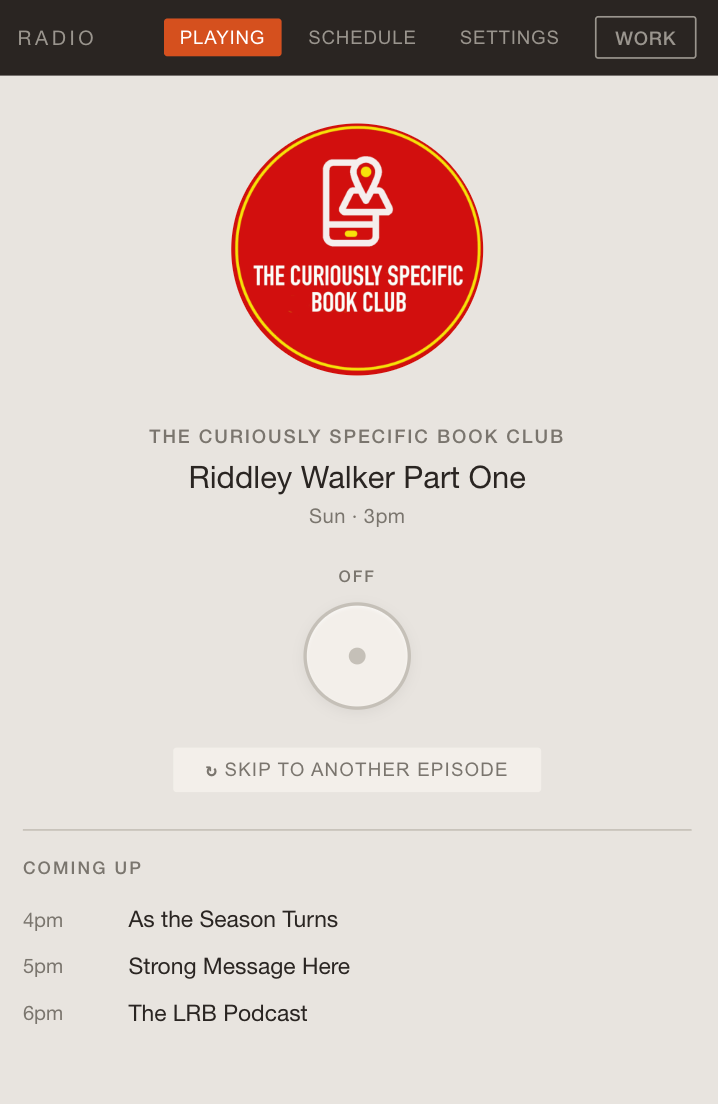
I've always wanted podcasts to be more like radio. I want to be able to turn something on, like a radio, and for audio to just come out. No choosing, just listening. So, of course, my second vibecoding experiment was to try and build something that does that.
Here it is.
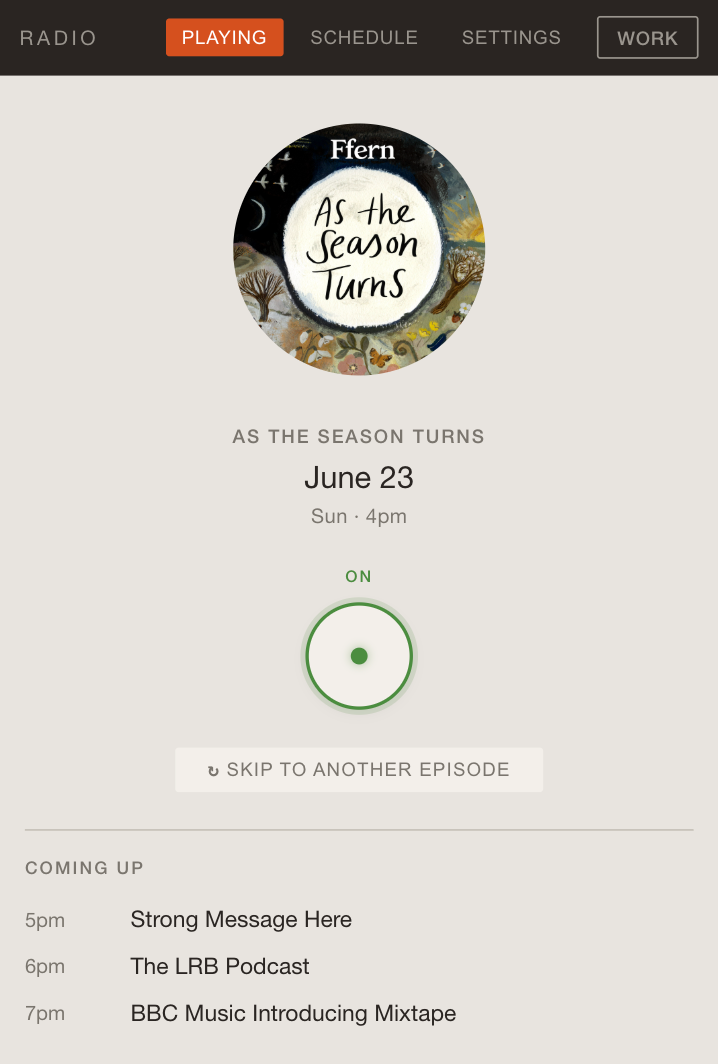
You put podcasts into hourly slots across the week and whenever you 'tune in' it plays an episode of that podcast. It doesn't ask you questions, it makes assumptions. If the episode is too short it just starts playing another one until the hour ends. And then, on the hour, it starts something else. (Though, if you really want, you can skip to a different episode)
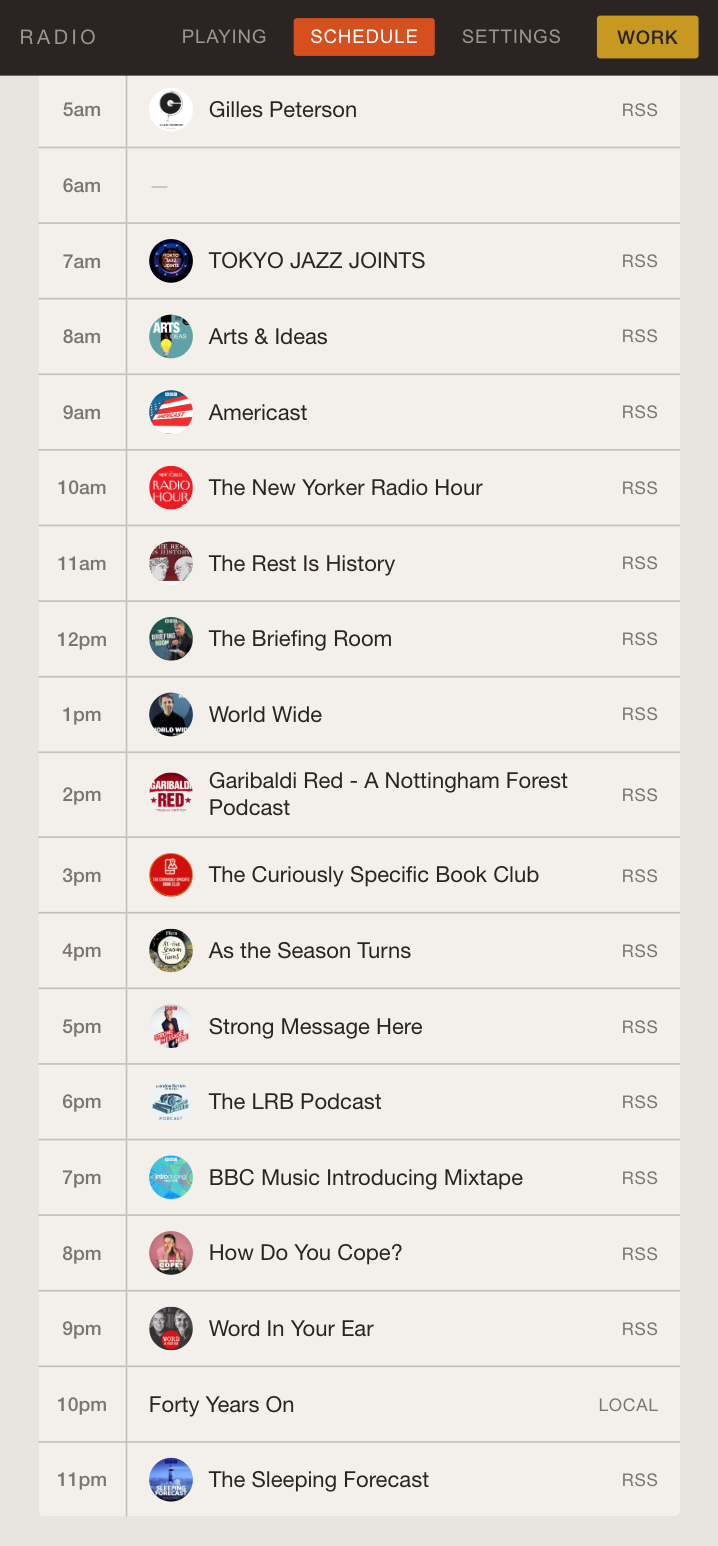
You programme it by putting podcasts into slots. And it's got a tool that makes grabbing RSS etc a little easier:
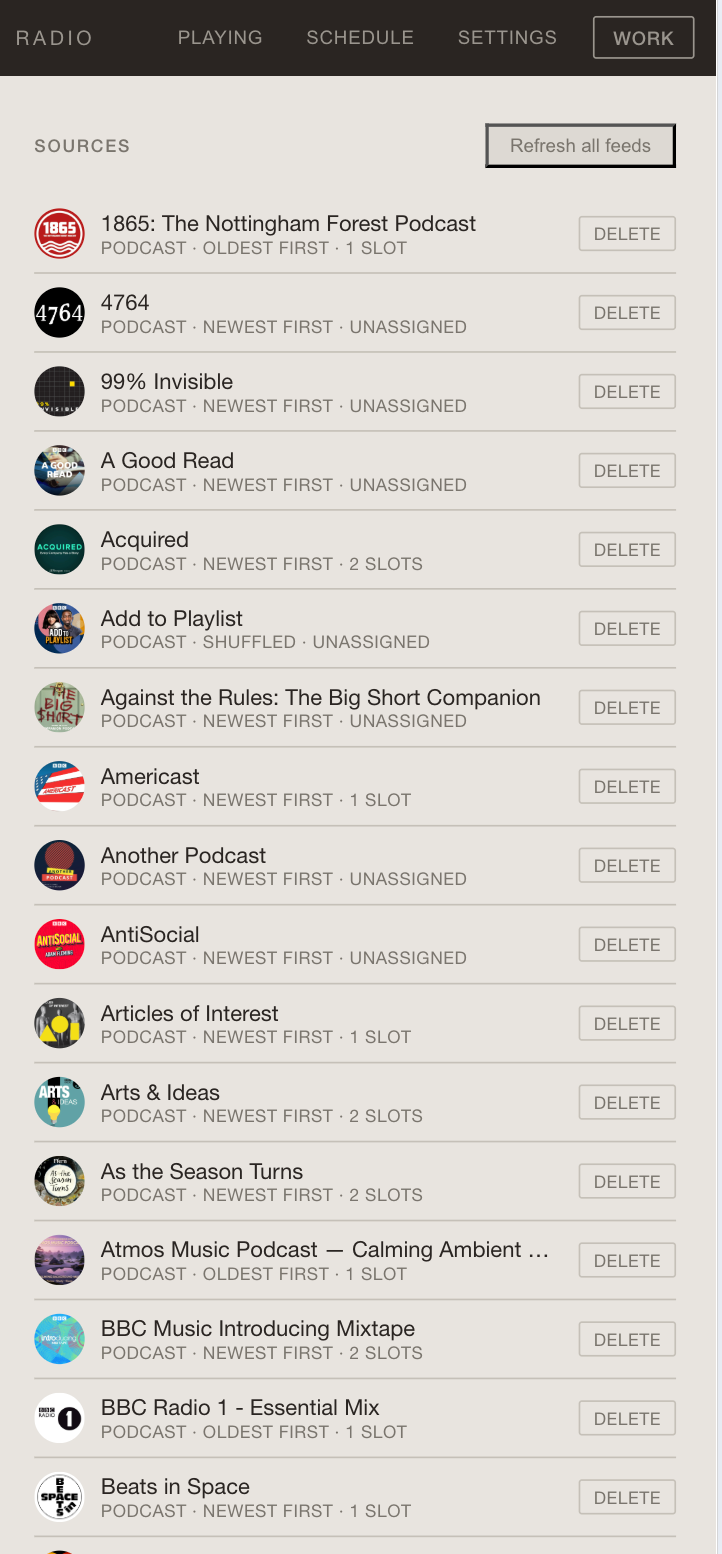
And it's got a WORK button for when you're supposed to be working. That switches the schedule to something appropriately productive.
I was thinking - how do I share the code etc with people, in case they'd like their own. But, of course, that's not necessary any more. I built this with Claude Cowork. If you want something similar you can just do your own. Though, should you want to, I got Claude to sum up the design/code decisions...
Build Brief: Personal Radio Station
What you're building
A personal radio station web app. A single HTML file that plays podcast feeds on a weekly schedule. When you open it, it figures out what day and hour it is, looks up what's scheduled, and starts playing — as if it were a real radio station that's been broadcasting continuously.
The whole thing should be a single index.html file (with inline CSS and JS) that can be deployed on any static hosting (Netlify Drop, GitHub Pages, Vercel, etc). No backend. No build step.
Core concept: the virtual clock
This is the heart of the app. The virtual clock:
- Gets the current day of week and hour (e.g. Wednesday 3pm)
- Looks up the schedule to find which podcast feed is assigned to that slot
- Picks an episode from that feed (based on a playback mode — see below)
- Calculates the offset within the episode — i.e. how many seconds into the hour we are, and therefore how far into the episode playback should start
- If an episode is shorter than an hour, it chains the next episode to fill the remaining time
- Starts playing from the calculated offset
The effect is that you're "tuning in" to something already in progress, like real radio.
Data model
Use IndexedDB for all client-side storage. You need these object stores:
Sources
A podcast feed or local audio collection.
id(auto-increment)type: 'rss' or 'local'name: display nameurl: RSS feed URL (null for local)artwork_url: podcast artworkplayback_mode: 'ordered' (oldest first), 'newest' (newest first), or 'shuffled'
Slots
The schedule grid. 8 grids × 24 hours = 192 slots.
key:"${grid}-${hour}"e.g."mon-14"(primary key)grid: 'mon', 'tue', 'wed', 'thu', 'fri', 'sat', 'sun', or 'work'hour: 0–23source_id: references a source, or null if empty
Episodes
Fetched from RSS feeds, cached locally.
id(auto-increment)source_id: references a sourcetitle,audio_url,guid,pubDate,duration
Audio blobs (optional)
For local audio files stored in IndexedDB.
key: string identifierblob: the audio file as a Blob
Schedule UI
The schedule view should have:
- 7 day tabs (Mon, Tue, Wed, Thu, Fri, Sat, Sun) plus a Work tab
- A 24-hour grid showing each hour slot with the assigned podcast (artwork, name) or empty
- Clicking a slot opens a modal to assign a podcast (from existing sources or by adding a new one)
- A "Clone day to..." button that copies one day's entire schedule to other selected days
- A green indicator on the current hour if viewing today's schedule
Adding podcasts
Two ways to add a podcast:
1. Search (iTunes API)
Use the iTunes Search API: https://itunes.apple.com/search?term=QUERY&media=podcast&limit=12
This returns JSON with feedUrl, collectionName, artworkUrl100, etc. The feedUrl is the RSS feed URL. The iTunes API has CORS headers, so try fetching directly first before falling back to proxies.
2. Feed URL
Paste an RSS feed URL directly. Parse the XML to extract podcast title, artwork, and episodes.
BBC Sounds detection
If someone pastes a BBC Sounds URL like https://www.bbc.co.uk/sounds/brand/p08qj0y1, detect the pattern and convert it to the RSS feed URL: https://podcasts.files.bbci.co.uk/{id}.rss
CORS proxy cascade
Browsers can't fetch RSS feeds directly from most podcast hosts due to CORS. Use a cascade of public CORS proxy services, trying each in turn with a timeout:
https://api.allorigins.win/raw?url=https://corsproxy.io/?url=https://cors.sh/https://thingproxy.freeboard.io/fetch/
Remember which proxy worked last and try it first next time.
RSS parsing
Parse the RSS XML to extract:
- Channel title, artwork (
<itunes:image>or<image><url>) - Episodes: title, audio URL (
<enclosure url="...">), guid, pubDate, duration (<itunes:duration>)
Episode selection logic
When the clock engine needs to pick an episode for a source, the playback mode determines which:
- Newest first: sort by pubDate descending, pick the first
- Oldest first: sort by pubDate ascending, pick the first
- Shuffled: use a deterministic pseudo-random shuffle seeded by the source ID, so the order is stable across page loads
Episode chaining
An hour is 3600 seconds. If the selected episode is shorter than an hour, build a sequence: start with the picked episode, then add subsequent episodes until you've filled 3600 seconds. The virtual clock offset then indexes into this sequence.
Now Playing view
The main view should show:
- Podcast artwork (circular, large)
- Source name and episode title
- Current day and hour (e.g. "Sat · 5pm")
- A power dial (see below)
- A "Skip to another episode" button
- Coming up: the next 3 scheduled slots
Auto-refresh this view every 5 seconds to handle hour transitions.
The power dial
Instead of a play/pause button, use a radio-style power dial:
- A circular button that toggles between ON (green indicator) and OFF
- ON = audio unmuted and playing
- OFF = audio muted (but still conceptually running at the right position)
- The radio should auto-play when opened (start muted, then auto-power-on if the browser allows autoplay)
Radio sound textures (Web Audio API)
Generate these sounds programmatically using the Web Audio API — no external sound files:
- Tune-in static (0.7s): White noise through a bandpass filter (1800Hz, Q=0.8), with fade-in/fade-out envelope. Plays on first power-on.
- Dial sweep (0.35s): White noise with a bandpass filter that sweeps from 800Hz → 3200Hz → 1200Hz. Plays when transitioning between episodes at the hour boundary.
- Crackle (0.2s): Sparse random pops (white noise at 15% density) through a highpass filter (2000Hz). Plays on skip/reshuffle.
- Band click (0.25s): A short sine impulse (800Hz, 8ms) followed by a tiny burst of bandpass-filtered static. Plays when toggling Work mode.
Work mode
A separate toggle in the nav bar. When activated:
- Overrides the clock to always use the 'work' grid regardless of day
- Plays a "band click" sound on toggle
- Persists state to localStorage
Cross-device sync (URL-based)
Since there's no backend, sync via URL:
- Compress the station config (sources + slot assignments) to JSON
- Compress with DeflateRaw (via CompressionStream API)
- Encode as base64url
- Append to URL as
#station=ENCODED_DATA - On load, detect the hash, decode, and offer to import
PWA support
Add these for mobile persistence:
manifest.jsonwith app name, theme colors, icons- A service worker with stale-while-revalidate caching strategy
navigator.storage.persist()to prevent IndexedDB eviction- Apple mobile web app meta tags
Visual design direction
The design should feel like a piece of hardware, not a software app. Take inspiration from Dieter Rams' Braun products (specifically the Braun Audio 308):
- Colour palette: warm off-white body, dark charcoal control strip (nav bar), blood orange accent for active states, leaf green for "on" indicators, honey yellow for Work mode
- Typography: Helvetica Neue or similar, light weights, uppercase labels with generous letter-spacing
- Nav bar: dark strip across the top, like the 308's control panel
- Artwork: displayed in circles (mimicking a speaker grille)
- Borders: tight radius (2-3px), subtle
- Overall feel: clean, warm, minimal, tactile
Local audio support
As well as RSS feeds, support uploading local audio files (mp3, m4a, wav, ogg) that get stored as blobs in IndexedDB. These can then be assigned to schedule slots like any other source.
Import/Export
- OPML export/import: standard podcast feed list format
- JSON backup: full backup of sources, slots, episodes, playback history
- Share link: the URL-based sync described above
What you don't need
- No user accounts or authentication
- No backend or database
- No build tools, bundlers, or frameworks
- No external CSS or JS libraries (except what's available via CDN if needed)
- The whole app should be a single HTML file